Everything you need to master addictive productivity.
Quick Start
Up and running in five minutes. Four ideas make the whole game.
Points
Earned by completing habits and to-dos, matched to your effort.
Habits Big or small, they build the person you want to be.
To-dos One-off tasks. Get them done, take the points, move on.
Tap Add habit or Add to-do on your dashboard, then Done when it’s done.
Add habitAdd to-do
Every habit you create is a vote for the person you want to become.
Every to-do you tick off is one less thing on your mind.
Targets
Three every day. They rise as you do, and ease when you need it.
Bronze Your daily minimum. Hit it and you’ve won the day.
Silver More than enough.
Gold A standout day.
Hit Bronze. The rest will follow.
Mojo
Your productivity savings account.
Earn it Every day you hit Bronze, your daily minimum.
Keep it Log any task, every day. Log nothing and it drains.
Spend it Skip a habit, or book rest days. Guilt-free, nothing lost, streaks intact.
Goals
Set your own, like 5 times a week for 4 weeks.
Track it See how far you’ve come, and how far to go.
Share it Send the link to friends who’ll cheer you on.
What Next?
You're set! From here, you can explore the rest of this guide to learn about:
Task management – bonus points, flagging, archiving, and more.
Tags – organize tasks and filter your stats by category.
Daily Targets – your auto-adjusting daily Bronze, Silver, and Gold targets.
Auto-Adjust – let HiyaMojo motivate you with increasing points on neglected tasks.
Streaks – track your consistency overall and for every habit individually.
Mojo – your productivity savings account, earned every day you hit Bronze.
Goals – give any habit a pace and an end, and share your progress.
Stats dashboard – deep-dive into your stats, insights and the Atlas.
Dashboards
Tasks for daily action, Stats for the bigger picture, and Goals for a personal challenge.
Tasks
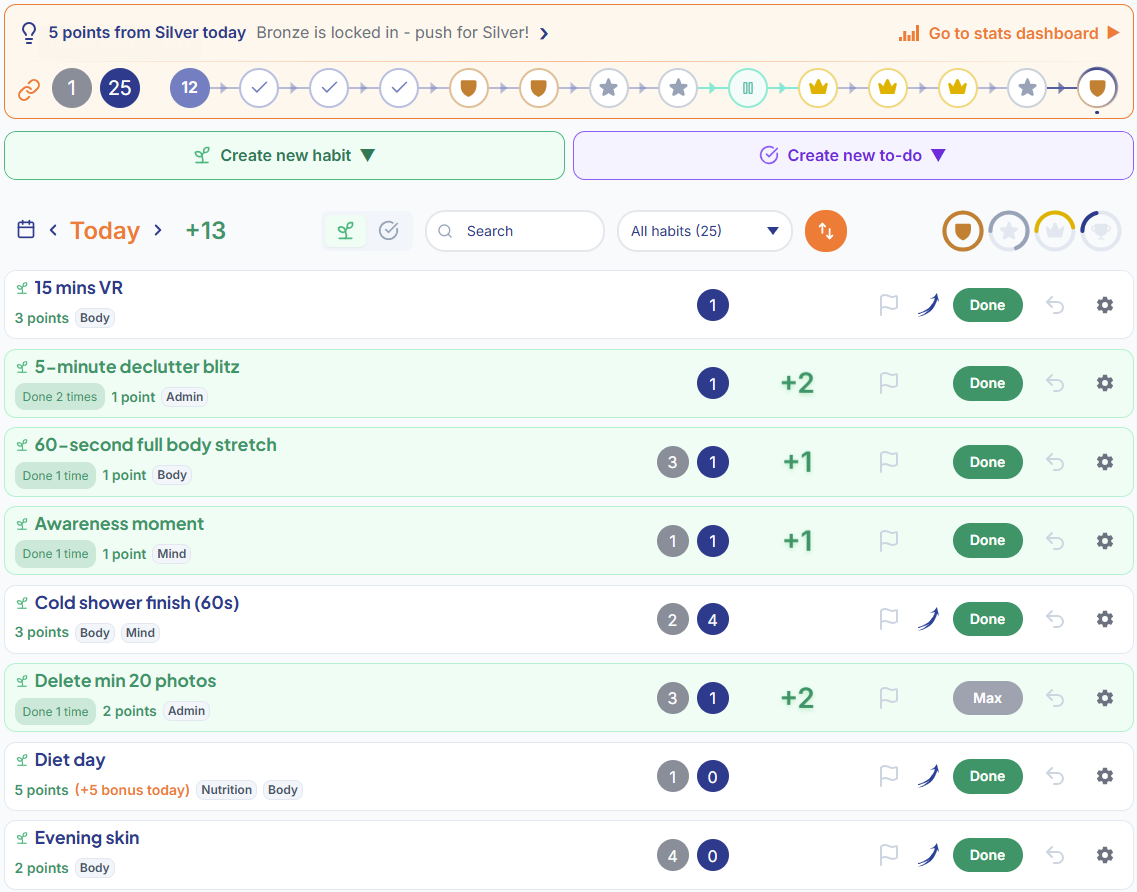
Your tasks dashboard is where the daily action happens – log habits and to-dos, track streaks, and watch your progress bar fill up in real-time.
We cover each feature in detail below – this is just your first look.
Your tasks dashboard is where the daily action happens.
The tasks toolbar lets you change date, toggle between habits and to-dos, search, filter, sort, and monitor your progress toward today's targets – all in one place.
The tasks toolbar gives you quick access to all controls.
Stats
Your stats dashboard is where you see the bigger picture – targets, points, streaks, Mojo, and the insights that tie it all together.
Targets
Points
Mojo
Streaks
Organized into sections. Tap the buttons at the top of your stats dashboard to bring any section to the top:
Targets – your daily auto-adjusting targets and how often you hit them.
Points – comprehensive points statistics.
Tags – bloom chart showing how your effort is distributed across tags, with Today / This week / This month / This year / All time views and an opt-in comparison ('vs. yesterday', 'vs. last week' and so on) that draws the period before as dashed outlines.
Mojo – your Mojo growth, penalties, and spending history.
Streaks – main, habit and tag streaks all broken down for you.
Atlas – a collector's wall of landmarks that light up as you play. Most stay dark until you earn them, so there is always something left to find.
Each section also has its own section-specific insights bar.
Targets
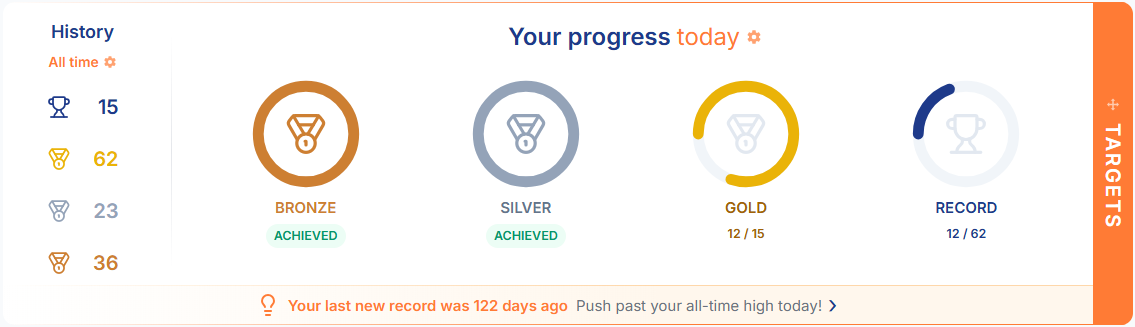
Just aim for Bronze every morning, and the rest will follow. Track the targets you've hit, your stats and insights here.
Date picker and view toggle (bars or radials)
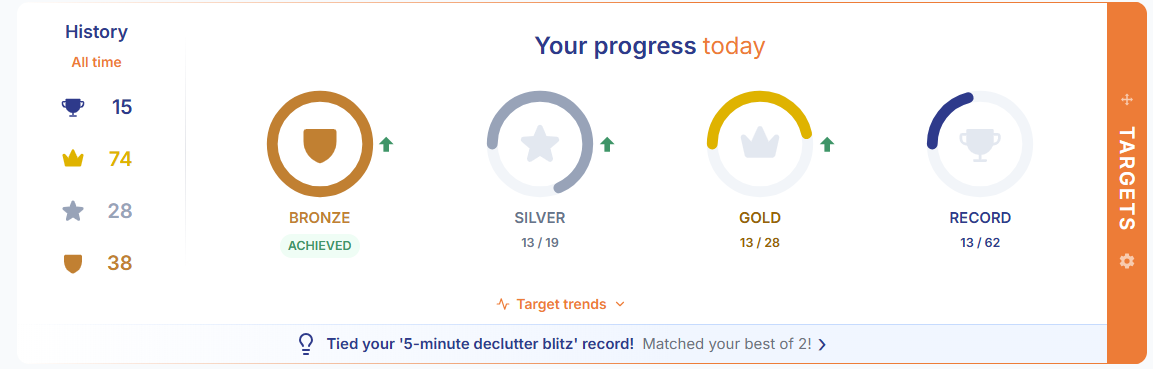
History – how many Rest, New Record, Gold, Silver and Bronze days you've had, with time period filters (this week, month, year, or all time).
Points
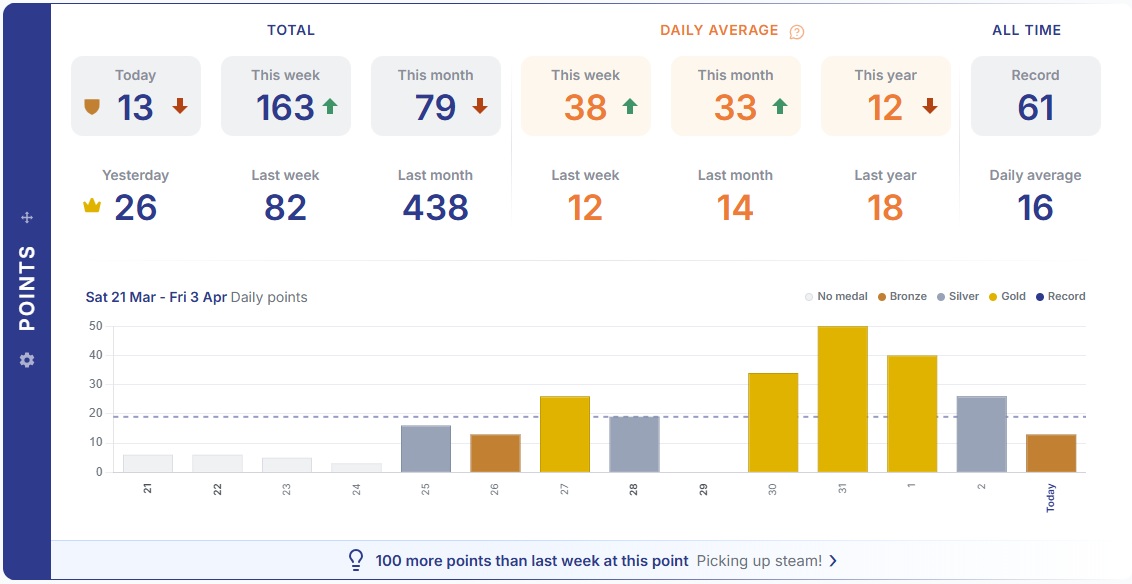
Love numbers? This section gives you a full breakdown of your point totals and averages across 14 stat cards.
TOTAL – compare your points today, this week and this month with the previous day, week and month.
DAILY AVERAGES – compare your daily average for the week, month or year with the previous week, month or year.
ALL TIME – your all time daily record, and your all time daily average.
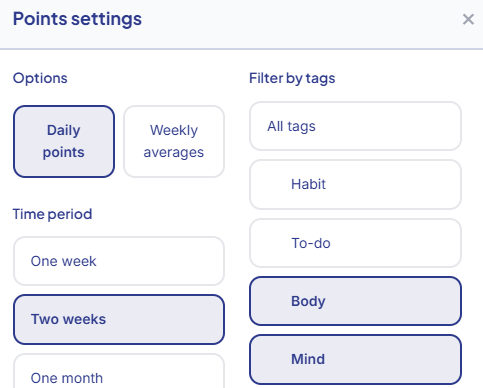
Below the stat cards, you have your points bar chart. Each bar is color-coded by the day's result – Bronze, Silver, Gold, and New Record – so you can see your daily performance at a glance. Hover over any bar to see the day, date and points total. Click on to adjust the chart time period, switch between daily points and weekly averages, or filter by Tag. When filtering on a Tag(s), all stat cards and the chart will update and display points and averages for the chosen Tag(s), within the specified time period.
Streaks
The Streaks section shows aggregate statistics across all your habits:
Current Streak – how many consecutive days you've been active.
Personal Best – your all-time best consecutive run.
Previous Streak – your previous streak count, before it was broken.
Average Streak – your typical streak length.
Goals Beta
Choose one of your habits and give yourself a finite challenge. Goals use the activity you already log on Tasks.
Add a Goal
Open the goal-flag icon between Tasks and Stats in the navbar, or choose Set goal from a habit's menu. Pick the habit, then say the goal the way you would say it out loud:
3 times a week for 4 weeks – every log counts, including repeats on the same day.
On 5 days a week for 4 weeks – each day counts once. Under More ways to play you can ask for more than one log before a day counts.
The cadence can be a day, a week, a month (30 days) or any number of days you choose, and a goal runs for up to 365 days in whole weeks, months or blocks. The line under the sentence shows the total: That's 12 times over 28 days. Rest days pause the clock.
In a row is off by default. Off, a week you fall short in simply doesn't add to your total. On, it sends your earned weeks back to 0 and the count starts again with the next week. Either way, nothing you've logged is lost and every week stays in Details.
You can have several independent goals for the same habit. Adding a goal closes the form and puts the new card on your board; your rules stay ready for the next one. The Add goal tiles open the same form; its open or closed state is saved to your account.
Read Your Progress
A goal starts the first time you log its task, including activity already logged on the day you added it. A later correction never moves that start.
The ring is cut into one segment per week (or day, month or block). Blue segments are earned. The orange segment is the one you are in now, filling one fine slice per log until it is earned: a week counts only after its last day ends in your account timezone. The line under the ring says where you are, for example 2 of 3 by Sun · 21 days to go. Extra logs never spill into the next week.
Booked rest days pause the goal's clock, while anything you log during rest still counts. Adding rest never takes back a week you have already earned. A Mojo cover counts as one log, or as one day, whatever the daily minimum.
Tap the three dots on a card to open its Details: the full commitment, when it started, the week-by-week history and the actions. Goals follow your account timezone; changing it cannot reopen days already closed. Undo and corrected activity recalculate progress.
Edit, Stop and Keep History
You can edit a live goal's rules; its progress recalculates from the original start. A completed goal stays on your board until you move it to History. If a correction removes completion, it returns to the board with an explanation.
Stop saves a fixed result in History. Start again prepares a fresh goal. Archiving the task lets its goals continue; permanently deleting the task first saves their results in History. Deleting a goal leaves the task and its activity intact.
Use the Feedback button on the Goals banner to share up to 5,000 characters. If sending fails, your text stays available to retry. A successful submission means it was accepted for delivery.
Share Your Progress
Tick Share my progress with a link under More ways to play when you add a goal, or tap the share icon at the top-left of the card (it is also a switch in the goal's Details). Your goal gets its own page showing your username, the goal's name, the ring and the line beneath it, exactly as on your card. Anyone with the link can see it; nothing else about your account is shown.
Visitors can send you one cheer a day from a short list of phrases, with their name if they like. Each cheer arrives in your notifications. Tracking your progress helps you reach your goals, and sharing it helps more; the small plate under the checkbox links to the research.
The share icon on the card is grey while the goal is private and orange once its link is live. Tap it again to stop sharing (you are asked first, because the old link stops working and switching back on makes a new one); stopping or deleting the goal also retires the link, and the page then says the goal is no longer shared.
Your Tasks
Tasks are at the heart of HiyaMojo. Build a library of habits and to-dos that reflect who you want to become and everything you want to get done.
Habits & To-Dos
Two types of tasks, each with a different purpose:
Habits
Recurring tasks that appear on your dashboard every day (or on the specific days you choose). These are the foundation of lasting change – exercise, reading, stretching, journaling, meditation, or any routine you want to build.
To-Dos
One-off tasks that earn points toward your daily targets and automatically archive once done. Errands, appointments, admin – get it done and get your points.
Tip: Don't hold back – the more tasks you have, the more ways you can earn points. Search, filter, and sort make it easy to find quick wins or big-pointers when you need them to hit your daily targets.
Creating & Editing Tasks
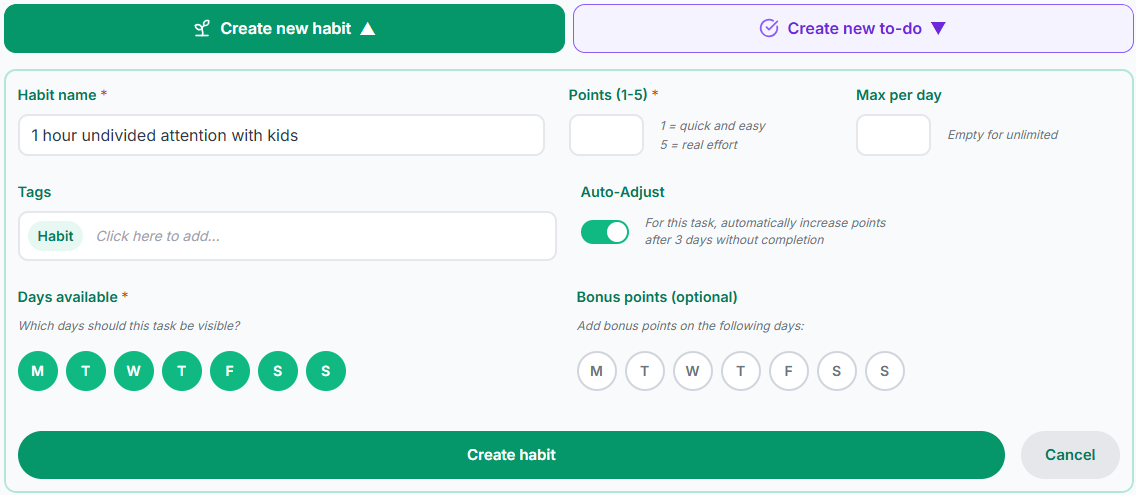
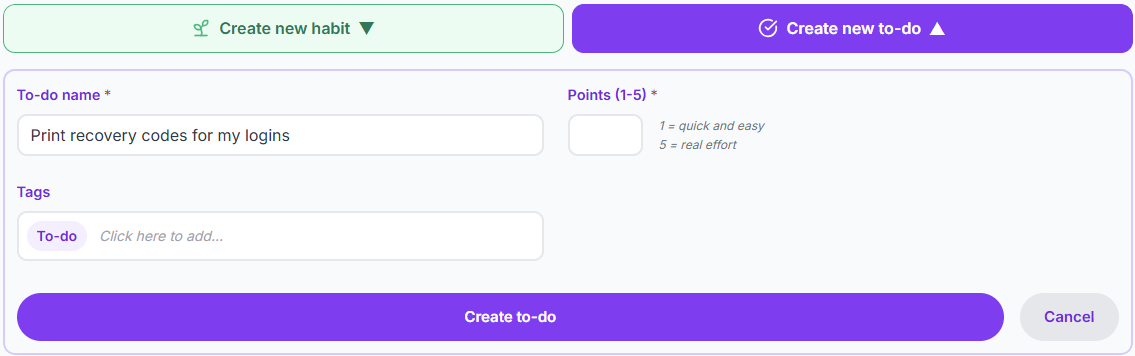
Tap Add habit or Add to-do on your dashboard. Here's what each field does:
Task name – a clear, action-oriented name (e.g., "30 minutes of reading", "Take vitamins").
Type – choose Habit (recurring) or To-do (one-off).
How much effort? – rate the task on the effort slider, from easy to intense. See Effort & points below.
Bonus days – star the days a task needs extra effort. See Bonus Days.
Need to cap how many times a task can be logged per day? Open the task from your list and set a Max per day in task settings. To edit any other field later, tap the settings icon on the task card.
Every field is optional except the task name and effort.
Points
Every task earns points when you complete it. You set how many with the effort slider: how difficult or important the task is for you personally. You'll see what it earned each time you press Done.
Low effort – quick wins that take a minute or less (take vitamins, make your bed).
Middle of the slider – moderate effort tasks (30 minutes of exercise, prepare a healthy meal).
Top of the slider – significant challenges (an hour of focused study, a difficult workout, tackling a big project).
Be honest with yourself – your points should reflect your reality, not anyone else's. What's easy for someone else might be a big effort for you, and that's perfectly fine. But don't over-score the easy ones either – save the top of the slider for the tasks that genuinely push you.
Things change: if a task gets easier over time (great news – it's becoming a habit!), move its slider down. Edits apply from today onwards – your past history stays exactly as you earned it.
You can set a task's points to auto-adjust based on how often you complete it.
Quick wins count: don't underestimate your quick wins. They build momentum early in the day and come in handy when you just need a point or two to hit your next target.
Bonus Days
Some days deserve a little extra. Star the weekdays that feel tougher for a task – Monday morning gym, Sunday evening reading – and those become bonus days for that task.
On a bonus day, your Done click fires a surprise reward on top of your base points. You never know exactly what you'll get – that's the fun of it. Watch for the orange star next to the task name on bonus days, then click Done and enjoy the surprise.
Tip: You pick which days matter to you. We handle the how much. Your favourite habit on a tough day becomes a little ritual worth looking forward to.
Key Habits
Some habits carry the day. Mark a habit as a key habit on the weekdays that matter, and it becomes the gate for that day's targets: until every key habit due that day is done, your Bronze, Silver and Gold targets stay locked – no matter how many points you've stacked up elsewhere.
You pick the key days with the same weekday circles you use for Days available and Bonus days – a habit can be key every day, or only on the days it tends to slip.
An orange key icon on the task row (and a lock beside the progress bar) means a key habit is still pending – both turn green once you're clear. Clicking the lock sorts your key habits to the top.
While locked, the day's targets render in grey – the colour snaps back the moment the last key habit is done.
A genuine New Record still counts – record days are never locked. (A first-ever Gold that also beats your best is awarded as Gold, so it can be locked like any other.)
Same-day rescue: complete the key habit any time before the day ends – or cover it with Mojo – and the targets unlock on the spot.
Rest days carry no key-habit obligation, and your main streak is never gated – only the day's targets are.
Tip: This is a commitment device – a promise to your future self. Use it for the one habit that makes everything else easier, and keep the list short: every key habit you add is another gate on the day's targets.
Max per day
By default, you can log a task as many times as you like each day. But some tasks should be capped – set a Max per day limit from task settings to control it.
Once you've hit the limit, the Done button changes to "Max" and won't let you log it again until the next day. This is useful for tasks where doing it more isn't necessarily better – like taking medication or watering plants.
Tip: Some users set a Max per day of 1 for tasks like "No smoking/vaping", while some prefer to earn points for each craving ignored and set a Max per day of 10, or no limit at all. Both are effective, whatever works for you.
Flagging Tasks
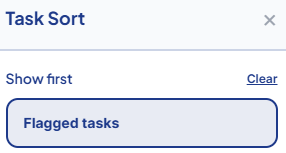
State your intention. Prioritize. Flagging isn't just a reminder – it's a commitment to yourself. Hover over the flag icon and you'll see "Flag your intent" – flag the tasks you're aiming to complete, then use the Sort menu's "Flagged tasks" option to bring them to the top of your list.
Flags are date-specific – each new day starts with a clean slate.
Flagged tasks show a filled blue flag icon.
Flags auto-clear when you mark a task as Done.
Use the "Flagged tasks" option in the Sort menu to show flagged tasks first.
Toggle "Include flagged" on the progress bar or in the Targets section to see ghost segments projecting where your flagged tasks would take you – at a glance, see whether your flags reach the next target.
Archiving Tasks
Tasks you no longer need can be archived via the task settings menu. They're hidden from your dashboard but your history is always preserved.
To-do tasks prompt you to archive or keep when completed. You can set a default in Settings > Preferences.
Habit tasks can be manually archived when you no longer want them in your daily rotation.
You can restore any archived task if you change your mind.
If you want to permanently delete a task and all its history, you can do so from the archive confirmation or from the archived tasks list.
Tags
Group your tasks by area of life and drill down into your stats to see exactly where you're thriving — and where you're not.
System Tags
Every task is automatically tagged by type:
Habit – assigned to all habit tasks.
To-do – assigned to all to-do tasks.
System tags can't be deleted or renamed – they're built in so you can always filter your stats by task type.
Custom Tags
New accounts come with tags to get you started: Body, Mind, People, Housework, Admin, Finance.
You can rename, delete, or create new tags to match your life. Add and manage tags when creating or editing a task. Each task can have multiple tags.
On smaller screens, task cards show the shortest tags that fit. Tap the + tag to show the rest, then tap it again to close. With a mouse, you can also hover over +.
Filtering by Tags
Tags aren't just for organization – they enhance your analytics. In the Points section of your stats dashboard, you can filter your stats by tag to see how you're performing in specific areas of your life.
This lets you answer questions like: "How many points am I earning from Body tasks this week?" or "Am I neglecting my Mind habits?"
Click on the icon to drill down into your stats.
Filter your stats by tag to focus on specific areas.
Daily Targets
Every day is a fresh chance to hit your targets. Your targets adjust automatically — rising so gently that you won't even notice you're becoming more productive.
When you wake up, your target is Bronze. Hit Bronze? You've levelled up and won the day. Anything after that is a bonus.
How Targets Work
Each day, HiyaMojo sets three personalized targets for you:
Bronze – your daily minimum. Designed so you can almost always get there, even on low-energy days. Hitting Bronze is a genuine win.
Silver – ride the momentum of your Bronze. This is where a good day becomes a great one.
Gold – for when you're ready to have a phenomenal day. Something to be truly proud of.
New Record – smash your all-time daily best, once you've had a Gold day behind you. For those days when you're unstoppable.
The magic is in the momentum: hit Bronze and Silver suddenly feels within reach. You'll catch yourself scanning your task list for points to push you over the line. Hit Silver and Gold starts calling. This “just one more” feeling is what makes HiyaMojo addictive in the best possible way.
Your daily targets adjust to your progress over time.
How Targets Are Calculated
Your targets evolve with you every single day. They rise as you improve and ease off if you've had a quieter period – always keeping you challenged but never overwhelmed.
Your Bronze target is always achievable. Your Gold target is always a stretch. No matter where you are in your journey.
All points count toward the day's score, but only base points (the points matched to each task's effort) are used to calculate targets – keeping your adjustments smooth and in step with your energy levels.
Live Progress Tracking
Track your daily progress in real-time across both dashboards – your tasks dashboard for a quick glance, your stats dashboard for the full picture.
On the tasks dashboard, you'll see a progress bar showing your current target directly above your habit and to-do list – tap it to jump straight to the Targets section on the stats dashboard for the full breakdown.
The insights bar in the Targets section analyzes your patterns and surfaces things you might not spot on your own.
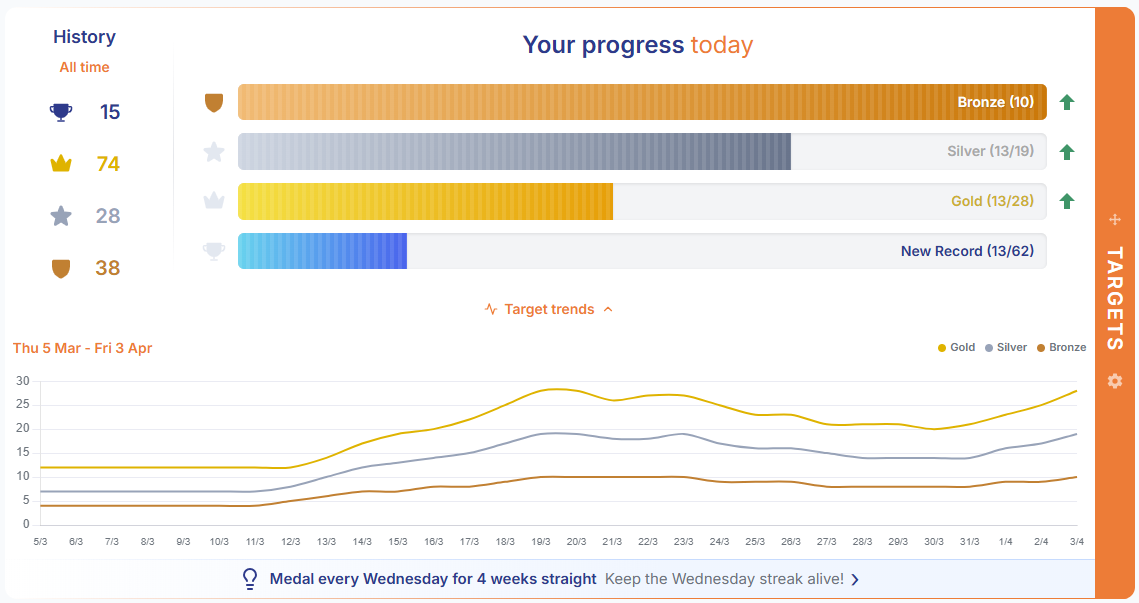
Want to see how your targets have changed over time? Tap Target trends below the progress bars to reveal a line chart showing your Bronze, Silver, and Gold targets evolving day by day. Use the settings gear to adjust the time period.
Try this: check yesterday's points each morning and make it your mission to beat it by just 1 point. Your targets will adjust and nudge you forward – before you know it, it's snowballing.
Watch how your targets evolve as your productivity changes.
Auto-Adjust Points
Avoiding a task? HiyaMojo notices — and gradually increases its reward to give you the push you need.
How Auto-Adjust Works
When you enable Auto-Adjust, HiyaMojo monitors how long it's been since you last completed each habit task. After a configurable number of days without completing a task, its reward starts to grow.
The longer you avoid a task, the more it's worth when you finally do it. That task you've been putting off? It's now worth even more points.
When you complete the task, the reward drops back to its starting value. The cycle then begins again if you stop doing it.
On the tasks dashboard, any task whose reward is climbing shows a pulsing orange dot — the bigger the dot, the bigger the reward waiting for you. Tap or hover over it to see "Increasing reward".
Configuring Auto-Adjust
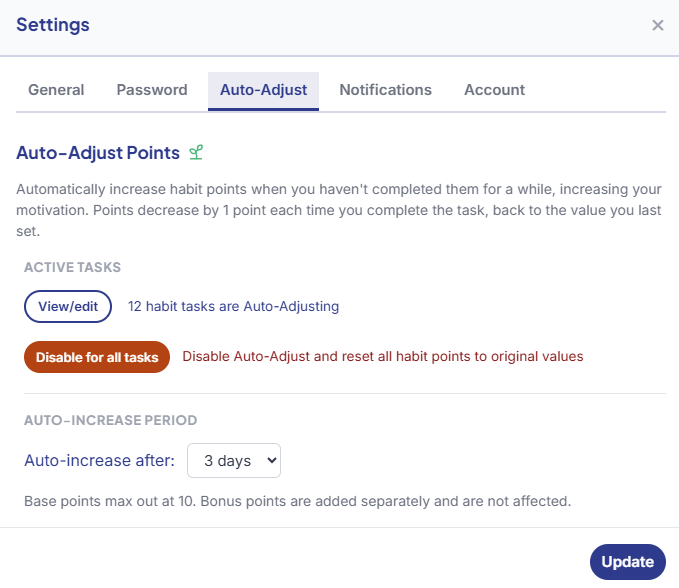
You can customize Auto-Adjust in your Settings:
Threshold (1–7 days) – how many days of inactivity before points increase. The default is 3 days.
View/edit tasks – see how many habit tasks have Auto-Adjust enabled, and disable it for individual tasks you don't want affected.
Disable for all tasks – turn off the increasing reward entirely across all habits. You can re-enable it at any time.
Auto-Adjust is smart about tasks that are only available on certain days. It counts available days, not calendar days.
Day-restricted tasks also receive a larger boost when their reward climbs, to account for their less frequent availability.
The reward updates live – the moment a task crosses your threshold, its dot appears, and it keeps growing each day you leave it (up to a sensible cap).
Fine-tune Auto-Adjust to match your preferences.
Resetting Points
Two ways to clear an increasing reward:
Single task – open the task's settings and reset its reward individually.
All tasks at once – use "Disable for all tasks" in Settings to clear the increasing reward on every habit.
After disabling, you can re-enable Auto-Adjust at any time – the cycle starts fresh.
Streaks
Consistency is where real change happens. Streaks track how many days in a row you show up.
Main Streak
Your main streak counts consecutive days where you completed at least one task – any task. It doesn't matter which one or how many. Show up, do something, and your streak continues. Miss a day entirely? It resets to zero.
Your main streak is always visible at the top of your tasks dashboard.
Your main streak counts every day you show up.
Reading the Streak Display
On the tasks dashboard, each habit shows its own streak as two circled numbers:
Previous streak – a grey circled number showing how many consecutive days your last streak lasted.
Current streak – a blue circled number showing your active run.
Hover over either number, or tap it on a phone, to see the day the streak started or ended.
Grey for previous streak length, blue for current. Beat the previous!
Your main streak row at the top of the dashboard has the same two numbers, followed by day circles: the days of your current streak, up to 14 on desktop and 5 on a phone. A tick marks a day you logged, a tier icon a day at Bronze or better, and a tent a rest day. Until you log something, today's circle shows a small arrow pointing down to your tasks.
When your streak is longer than the row, the first circle shows how many more days are off-screen. Hover over any circle to see its date, and click or tap it to open that day.
Habit & Tag Streaks
Beyond your main streak, every individual habit tracks its own streak – consecutive days you've completed that specific task. These help you see which habits you're nailing and which ones need attention.
Tag streaks work the same way but at a category level. If you have three tasks tagged "Body" and you complete at least one every day, your Body tag streak keeps going.
Streaks in Your Stats
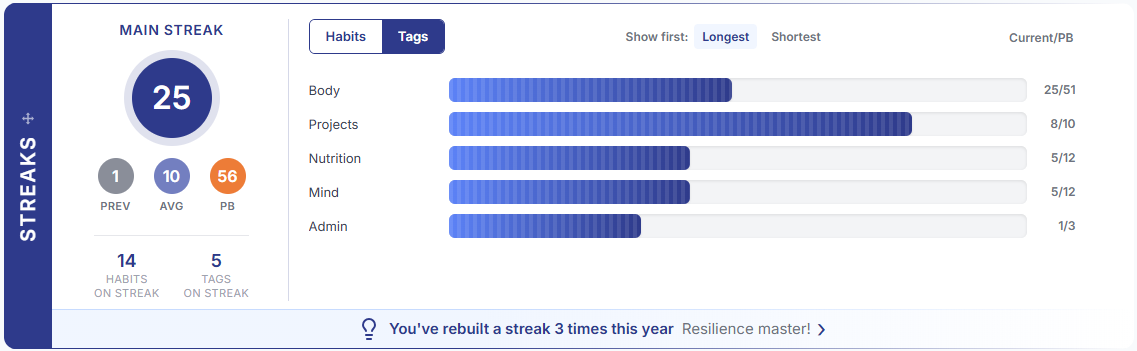
The Streaks section on your stats dashboard gives you the bigger picture: your current main streak front and centre, with Previous, Average, and Personal Best (MAX) below it.
Below that, your habit streaks appear as progress bars filling toward each personal best. Toggle between Habits and Tags to switch views, and expand to see all active streaks.
The insights bar digs into your streak patterns and helps you keep them alive.
Your full streak breakdown in one place.
Mojo
Bronze builds Mojo, your productivity savings account. It is effort and consistency banked, yours to spend. You do not need a reason.
Monitor your Mojo
Your Mojo balance is always visible in the navigation bar – you always know where you stand.
Your Mojo balance is always visible in the navbar.
Earning Mojo
Bronze builds Mojo. You earn +1 Mojo for every day you hit Bronze or better.
Consistency is rewarded, even on days where Bronze is all you can manage. Over time, your Mojo grows into a reserve you'll be glad you built.
Inactivity Penalties
If you don't hit Bronze but still log at least one task, nothing changes – you keep your balance as-is.
Log nothing for a day and your Mojo starts falling: -1 on day one, -2 on day two, -3 on day three, and so on. Penalties alone can't take your Mojo below zero, and logging any task stops the penalties and resets the count.
Covering with Mojo
Spend Mojo on habit tasks when you can't (or just don't want to) get to them – today or on past dates. The cost is the habit's base points (excluding any bonus or auto-adjust increases). Think of it as a safety net you've earned.
When you spend Mojo, the habit earns its base points toward the day's targets (a bonus-day roll or an increased reward never rides on a cover) and keeps your streak alive. You're spending stored effort – Mojo you built through past consistency – so the points are real.
If you have Mojo to spend, you've built it through consistent effort. It is effort and consistency banked, yours to spend. You do not need a reason.
Every Mojo spend shows up in the Mojo section so you can see exactly how and when.
Mojo Growth Chart
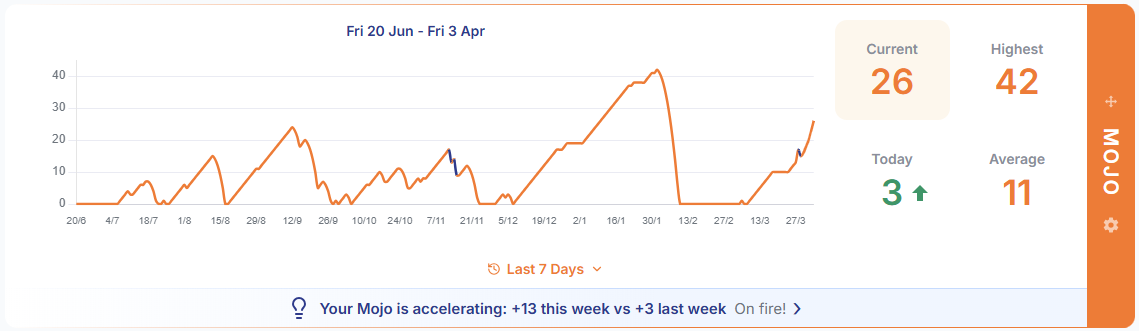
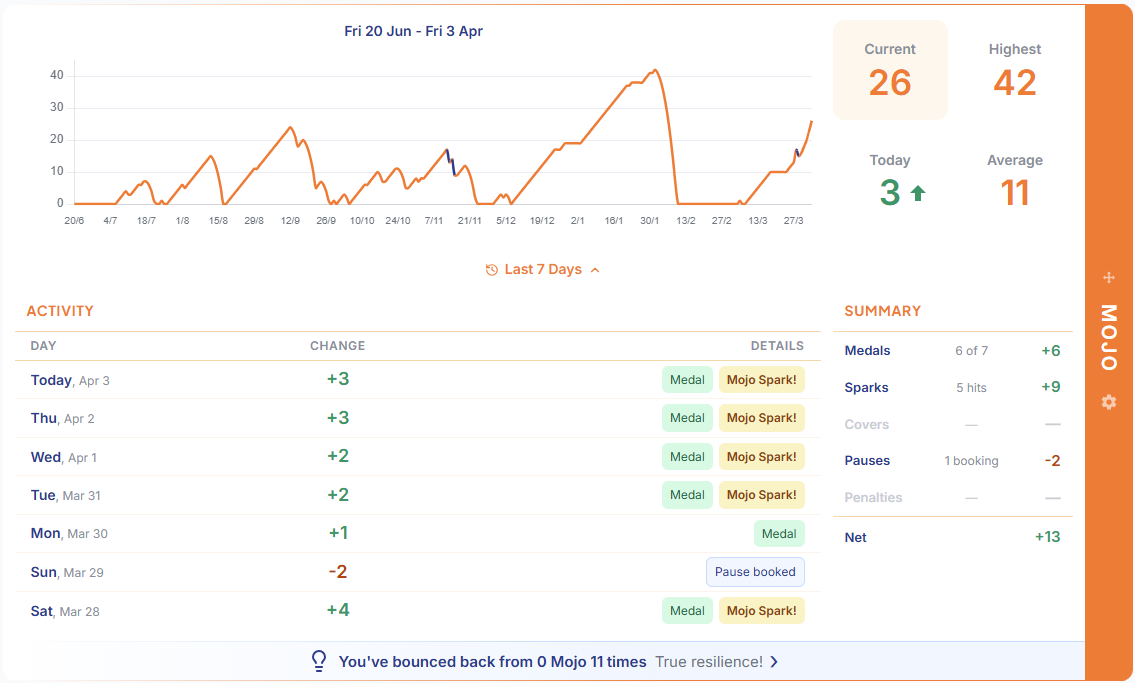
Track your Mojo over time with an interactive chart in the stats dashboard. Rest days are blocked out in striped teal – the same marker the Points chart uses – and drops from inactivity carry a soft red shading behind the dip. The line rises slowly with consistency – but drops fast if you go inactive.
Here you can also access a recent summary of your Mojo activity.
The insights bar in the Mojo section studies your growth, penalties, and spends to highlight trends you can act on.
Your dedicated Mojo section for detailed tracking.
Rest Mode
Going on holiday, taking a break, or just need some time off? Rest Mode lets you step away and do nothing at all. Mojo penalties are suspended while you rest, and you do not need a reason. Guilt-free, nothing lost, streaks intact.
Booking a Rest
Click Rest in the navigation bar to open the booking modal. Pick your start and end dates – a rest starts today or on a day to come. Just back from time away? The Welcome Back prompt (below) is where the days you missed can become rest after the fact.
While resting, you can still log tasks and earn Mojo normally. Rest only protects you from penalties on days you don't log – it never limits what you can do.
What It Costs
Each rest day costs 3 Mojo, deducted upfront when you book. The booking modal shows a clear cost breakdown so you know exactly what you're committing.
You need at least 1 Mojo to book a rest. Your balance can go negative from the booking itself or from extending – down to -20Mojo – so your rest can grow with your needs. No penalties apply while your balance is zero or below, and every Bronze-or-better day on your return chips away at the loan. Once you are back in credit, inactivity penalties resume where they left off. Think of it as borrowing from your future consistency.
What's Protected
During a rest:
Streaks are frozen – rest days don't break them and don't count toward them
Inactivity penalties are suspended – no Mojo lost for missed days
Daily targets ease while you rest – a rest day counts as a quiet day in the 14-day window your Bronze/Silver/Gold thresholds are read from, so they come down to meet you when you return (unlike the averages below, which leave rest days out)
Daily averages leave rest days out of both the points and the days they're divided by – a break can't drag your average down
Target history marks the day as Rest
Reminders rest too – by email and on your devices, we'll never nag you on a day you've booked off
You can end a rest early at any time from the banner above your tasks or the navigation bar – on a phone, the profile menu offers End Rest Early (or Cancel Rest / Change Dates for a rest that has not started yet). Unused days are refunded at the full rate.
Welcome Back
Missed just a day or two? That's a blip, not an absence – nothing pops up. Back-fill the day from the dashboard's date navigation if you did the work, or cover a habit with Mojo if you didn't.
Been away longer? After 3 or more missed days, when you return you'll see a Welcome Back prompt offering to turn those days into rest retroactively. No rush: it's there each time you come back, right up until you log something. The prompt appears as long as at least one rest day still fits within the maximum Mojo loan (-20) – the cost is borrowed against the Mojo you've earned, and the prompt shows you exactly where your balance will land.
When you return after 3 or more days away – whether a longer planned rest just ended, you accepted a retroactive rest from the Welcome Back prompt, or you dismissed it to come back cold – a Comeback Challenge appears: complete tasks for 3 days in a row to earn +3 Mojo. Miss a day? You have a few days to fill it in from the dashboard's date navigation before the challenge quietly retires.
Booked a rest partway through? Resting closes the challenge (the booking screen tells you before you confirm) – you've chosen time off, and a comeback is about coming back. Nothing is taken away: you keep your Mojo, your streak is safe, and after your next break of three days or more a fresh challenge will be waiting. It's an opportunity, not an obligation.
Cover vs Rest
Both features protect your progress, but they work differently:
Cover a habit
Rest Mode
Points
Base points earned
None from resting; anything you log still counts
Streaks
Continues
Frozen (not broken)
Daily targets
Counts toward targets
Still a quiet day in your targets' window; log anyway and the day is judged as normal
Scope
One habit, one day
All habits, multi-day
Cost
Habit's base points in Mojo
3 Mojo per day
Best for
Covering one habit on an active day
Stepping away entirely
In short: covering handles one habit and keeps the points flowing. A rest applies to every habit and puts the game on hold.
Ways to Play
Everyone uses HiyaMojo differently. Here are four play styles — find yours, or invent your own.
The Minimalist — Jess
Identity:One day at a time
Doesn't chase gold. Opens HiyaMojo, checks her minimum target for the day, crosses off enough to hit Bronze. Her target quietly rises over time — she barely notices, but her habits have transformed.
Bronze, every day.
Key mechanics: Bronze target, auto-adjust
The Recharger — Marco
Identity:Earns his downtime
Works hard so he can switch off harder. Stacks Mojo during busy weeks and books a rest when he needs to recharge. Guilt-free, nothing lost, streaks intact. Always comes back ready.
14 Mojo banked. 3-day rest booked.
Key mechanics: Mojo, Rest
The Addict — Anika
Identity:Hooked on the game
Doesn't need HiyaMojo. Just likes the game. Every morning flags what she wants to get done that day, watches points add up against yesterday's score. Often a quick scramble before bed to hit gold.
Tomorrow's targets rise. Good.
Key mechanics: Flags, Gold, auto-adjust
The Protector — Dev
Identity:Guards the streak
One rule: don't break the chain. Watches the main streak, every habit streak, every tag streak — knows where each one stands. When life comes for the chain, Mojo fills the gap. Quietly, the chain gets longer every week.
47-day streak unbroken. Sleeps well.
Key mechanics: Streaks, task streaks, tag streaks
Using on Mobile
HiyaMojo is designed mobile-first. Add it to your homescreen for the full app experience.
Built for Your Phone
HiyaMojo adapts to any screen size – phone, tablet, or desktop. The interface is the same everywhere, so you get the full experience on whatever device you're using.
Updates happen automatically. No app stores, no manual downloads, no waiting – you always have the latest version.
Add to Your Homescreen
One tap and HiyaMojo lives on your homescreen – its own icon, its own window, just like any other app. Here's how:
On iPhone (Safari):
Open HiyaMojo in Safari.
Tap the Share button (square with an arrow).
Scroll down and tap "Add to Home Screen".
Tap "Add".
On Android (Chrome):
Open HiyaMojo in Chrome.
Tap the three-dot menu in the top right.
Tap "Add to Home screen" or "Install app".
Tap "Add" or "Install".
That's it. HiyaMojo is now one tap away – right alongside your other apps. Open it each morning and start earning.
Frequently Asked Questions
Quick answers to the questions we hear most.
Is HiyaMojo free?
Yes. HiyaMojo is free to use, with no ads. If you sign up while it's free, it stays free for you.
Do I need to download an app?
No. HiyaMojo runs in any modern web browser, so there's nothing to install from an app store. It's a Progressive Web App, so you can optionally add it to your phone's home screen for one-tap access that looks and feels like a native app.
How is HiyaMojo different from a to-do list or habit checklist?
A checklist only shows what is left to do. HiyaMojo turns your habits and to-dos into a daily game: each task you complete earns effort-based points toward self-calibrating Bronze, Silver, and Gold targets that adapt to your own pace. Add streaks, a Mojo XP currency you can spend to skip a habit or book rest days, and personalised insights, and consistency starts to feel rewarding instead of like a chore.
How do points work?
You rate each task once for effort on a hidden slider. Harder or more-avoided tasks are worth more. HiyaMojo handles the scoring and reveals the points as a small animation when you mark a task done, so you build the habit instead of chasing numbers.
What are the daily Bronze, Silver, and Gold targets?
Every day has three point targets — Bronze, Silver, and Gold — calculated from your own recent activity rather than anyone else's. Bronze is an achievable minimum, and hitting it each day is enough to make real progress. The targets rise gently as you find your rhythm, and once you've had a Gold day behind you, a New Record bar lets you chase your all-time daily best.
What is Mojo?
Mojo is HiyaMojo's XP currency, your productivity savings account. You earn it every day you hit Bronze, your daily minimum. Spend it to skip a habit, or to book rest days. Guilt-free, nothing lost, streaks intact. It is effort and consistency banked, yours to spend. You do not need a reason.
What happens if I miss a day?
One missed day is a blip, not an absence. Your streaks reset and your Mojo dips a little. Everything else is where you left it: your habits return fresh tomorrow, your history is intact, and your targets barely move. Did the work but forgot to log it? Fill the day in from the dashboard. Didn't get to it? Skip a habit with earned Mojo. Guilt-free, nothing lost, streaks intact.
What happens if I miss several days?
Your targets ease to meet you. They read your recent productivity, so time away lowers the bar for coming back rather than raising it. Your Mojo dips further the longer you are gone, and when you return you can turn those days into rest retroactively, refunding the penalties. And a habit you have been away from a while starts offering a bigger reward, waiting for you. Come back three days running and you earn extra Mojo on top.
Can I set goals and share my progress?
Yes. Pick any habit and set a goal with a pace and an end, such as 5 times a week for 4 weeks. HiyaMojo tracks your progress as you log. If you like, share a link to the goal's page: anyone with the link can see your progress and send a cheer, no account needed. Goals is a new feature and still taking shape.
Is my data private?
Yes. HiyaMojo is built and operated in the European Union (Lithuania), and our Privacy Policy is written to meet the GDPR. Our servers run on Google Cloud in the United States, with EU-approved transfer safeguards in place. We collect only what is needed to run the app and never sell your data. See the Privacy Policy for the full detail.
Everyone uses HiyaMojo differently. We'd love to hear how you use it, what you like, and what you'd like to see improved. Open Contact from your profile menu any time, or use the button just below.
%20--%3e%3csvg%20version='1.0'%20xmlns='http://www.w3.org/2000/svg'%20xmlns:xlink='http://www.w3.org/1999/xlink'%20x='0px'%20y='0px'%20viewBox='0%200%20840.3%20464.3'%20style='enable-background:new%200%200%20840.3%20464.3;'%20xml:space='preserve'%3e%3cstyle%20type='text/css'%3e%20.st0{fill:%231E3A8A;}%20.st1{fill:%23FF7B35;}%20%3c/style%3e%3cg%20id='Layer_1'%3e%3c/g%3e%3cg%20id='Layer_2'%3e%3c/g%3e%3cg%20id='Layer_3'%3e%3cg%3e%3cpath%20class='st0'%20d='M521.3,313.5c3.9,0.1,15.6,0,15.6,0c0,0,0,0,0,0c-59.8,65.9-143.1,115.1-256,137.7%20c74.2-27.1,140.1-67.4,184.2-117.5c-52.9,30-106.4,45.3-135.8,51.2c-29.4,5.9-61.7,10.9-110.9,9.7c54-6.5,101.1-17.7,149.8-40.5%20c29.8-13.9,59.4-30.3,88.4-53.2c1.8,0.7,3.8,1.1,5.8,1.1c0,0,12.7,0,17.6,0c7.2,0,12.6-3.6,16.6-9.8c2-3,6.7-12.3,6.7-12.3%20s1.1,12.3,2.4,18.9C507.1,306.6,512.6,313.3,521.3,313.5z'/%3e%3cpath%20class='st0'%20d='M658.1,171.6c-15.9-16.2-31-35.5-31-35.5s-5.5,19.9-16.2,47.8c-12.9,0.1-25.3,3.5-35.7,9.8%20c-9.3,5.6-16.8,13.2-21.9,22.3l-2.9-24.1c19.8-34.6,30.4-65.7,34.3-84.1c-30.2,6.4-68.5,3.5-68.5,3.5s69.2-21.7,100.6-98.3%20C616.8,13.2,632.7,30.8,658.1,171.6z'/%3e%3cg%3e%3cpath%20class='st1'%20d='M10.9,172.2h25.5V223h60.3v-50.8h26.6v125.3H96.8v-51H36.4v51H10.9V172.2z'/%3e%3cpath%20class='st1'%20d='M162.2,158.2c2.3,0,4.4,0.4,6.3,1.1c1.9,0.8,3.6,1.8,5,3.1c1.4,1.3,2.5,2.9,3.3,4.7c0.8,1.9,1.2,3.9,1.2,6%20c0,2.2-0.4,4.1-1.2,6c-0.8,1.8-1.9,3.4-3.3,4.7c-1.4,1.3-3.1,2.4-5,3.1c-1.9,0.8-4,1.1-6.3,1.1c-2.3,0-4.3-0.4-6.2-1.1%20c-1.9-0.8-3.5-1.8-5-3.1c-1.4-1.3-2.5-2.9-3.3-4.7c-0.8-1.8-1.2-3.8-1.2-6c0-2.2,0.4-4.2,1.2-6c0.8-1.9,1.9-3.4,3.3-4.7%20c1.4-1.3,3.1-2.3,5-3.1C157.8,158.6,159.9,158.2,162.2,158.2z%20M149.4,201.9H175v95.6h-25.6V201.9z'/%3e%3cpath%20class='st1'%20d='M246.2,313.5c-3.3,8-14,23.3-35,21.9c-13.6-0.9-21-6.5-24.1-10l11-17c20.9,16.9,27.8-6.3,27.8-6.3%20l-39.3-100.3h27.2l25,69.5l23.9-69.5h26.6C289.2,201.9,260.2,279.1,246.2,313.5z'/%3e%3cpath%20class='st1'%20d='M356.3,286.5c-7.1,9.3-22.5,18.5-44.2,12.2c-19.5-5.6-26.3-26.2-17.9-42.2c7.3-13.9,27.2-15.1,33-15.1%20c6.9,0,27.8,0,27.8,0V237c0-5.8-4.7-15.7-22.9-15.2c-10,0.3-20.3,4.2-26.7,7l-7.9-17.7c0,0,5.7-3,8.9-4.6c3.2-1.5,6.6-2.8,10-3.8%20c12.1-3.5,27.8-4.4,39.7-0.7c9.5,3,16.1,8.7,19.9,14.5c2.4,3.6,5.2,10.7,5.2,21c0,15.2,0,60.6,0,60.6h-24.7L356.3,286.5z%20M332.2,281.6c10.7,0.2,21.7-3.6,22.5-16.6c0.1-2,0.3-8.2,0.3-8.2H333c-5.6,0-9.4,1.3-12,3.1c-2.2,1.6-4.1,5.3-4.1,8.4%20C317,276.4,323.5,281.4,332.2,281.6z'/%3e%3c/g%3e%3cg%3e%3cpath%20class='st0'%20d='M695.1,158.2c2.3,0,4.4,0.4,6.3,1.1c1.9,0.8,3.6,1.8,5,3.1c1.4,1.3,2.5,2.9,3.3,4.7c0.8,1.9,1.2,3.9,1.2,6%20c0,2.2-0.4,4.1-1.2,6c-0.8,1.8-1.9,3.4-3.3,4.7c-1.4,1.3-3.1,2.4-5,3.1c-1.9,0.8-4,1.1-6.3,1.1c-2.3,0-4.4-0.4-6.2-1.1%20c-1.9-0.8-3.5-1.8-5-3.1c-1.4-1.3-2.5-2.9-3.3-4.7c-0.8-1.8-1.2-3.8-1.2-6c0-2.2,0.4-4.2,1.2-6c0.8-1.9,1.9-3.4,3.3-4.7%20c1.4-1.3,3.1-2.3,5-3.1C690.7,158.6,692.8,158.2,695.1,158.2z%20M682.3,201.9v95.6h0L682.3,201.9L682.3,201.9z'/%3e%3cpath%20class='st0'%20d='M414,172.2h23.2l35.4,81.6l35.9-81.6h22.9l16.4,125.3h-26.5l-8.9-79.6l-30.5,68h-19.5l-29.4-68.7l-7.6,80.3%20h-25.5L414,172.2z'/%3e%3cpath%20class='st0'%20d='M660.4,229.4c-7.7-19.5-27.2-29.7-47.9-29.4c-20.6-0.3-40.2,9.9-47.9,29.4c-5,11.9-5,28.7,0,40.7%20c7.7,19.5,27.2,30,47.9,29.7c20.7,0.3,40.2-10.1,47.9-29.7C665.4,258.1,665.4,241.3,660.4,229.4z%20M612.4,277.5%20c-13.7,0-24.9-9.5-24.9-27.8c0-17.1,11.1-27.8,24.9-27.8c13.7,0,24.9,11.3,24.9,27.8C637.3,267.5,626.2,277.5,612.4,277.5z'/%3e%3cpath%20class='st0'%20d='M825.6,229.4c-7.7-19.5-27.2-29.7-47.8-29.4c-20.6-0.3-40.2,9.9-47.9,29.4c-5,11.9-5,28.7,0,40.7%20c7.7,19.5,27.2,30,47.9,29.7c20.7,0.3,40.2-10.1,47.8-29.7C830.6,258.1,830.6,241.3,825.6,229.4z%20M777.7,277.5%20c-13.7,0-24.9-9.5-24.9-27.8c0-17.1,11.1-27.8,24.9-27.8s24.9,11.3,24.9,27.8C802.5,267.5,791.4,277.5,777.7,277.5z'/%3e%3cpath%20class='st0'%20d='M708.4,201.9c0,0,0,72.1,0,89.2c0,9.6,1,24.6-7.8,34.1c-6.3,6.8-14.1,9.9-23.3,9.9c-9,0-19.9-2.5-26.3-8.5%20l10.4-18.4c0,0,2.9,3,9,4.5c6.1,1.5,12.1-3.1,12.2-9.4c0.2-29.5-0.2-101.5-0.2-101.5H708.4z'/%3e%3c/g%3e%3c/g%3e%3c/g%3e%3c/svg%3e)